
Webhooks are user-defined HTTP callbacks that are sent in response to an event's occurrence. Within MyDataHelps Designer, you may use a webhook to be notified of an event or to trigger a non-MyDataHelps action, possibly in your Clinical Trial Management System (CTMS). You may require a developer's assistance for using webhooks, specifically to set up your webhook URL to which the MyDataHelps will call.
Webhooks can be accessed from Project Webhooks tab.
Available Webhooks
The following webhooks are available in MyDataHelps Designer:
Survey Submitted
You can configure a webhook callback for when survey answers are submitted, specifying the applicable survey(s). Importantly, this webhook callback contains a participant's ID, so the callback will be participant-specific.
Visit our Developer Documentation for an overview of the Survey Submitted Webhook.
Scheduled
Webhook callbacks can be triggered by schedules:
- Navigate to your project's Webhooks tab in the left pane.
- Add your webhook, selecting "Scheduled" as the type.
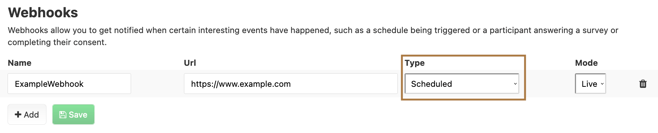
- Navigate to your project's Schedules.
- Create or edit your schedule, selecting "Add Webhook to Call" as an action.
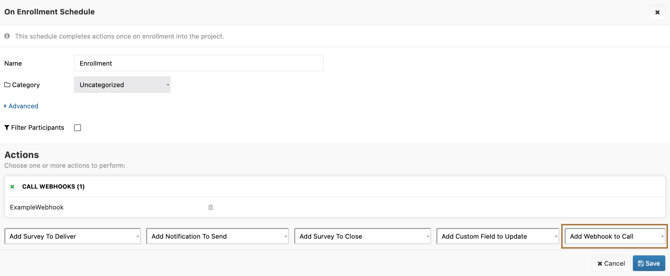
Webhook Parameters
The following parameters are included in webhook callbacks.
All Webhooks
The following parameters are included in all webhook callbacks:
The following parameters are now only a part of legacy webhooks and do not apply to any newly created webhooks:
PatientIdentifier: Identical toParticipantIdentifier.PatientID: Identical toParticipantID.
Survey Submitted Event Webhooks
A survey submitted webhook endpoint is invoked once each time a result is submitted for any of the associated surveys. The following parameters are included:
Schedule Triggered Webhooks
A schedule triggered webhook endpoint is invoked once, each time the associated schedule is triggered for a participant. The following parameters are included:
Testing Webhooks
When your webhook is configured, you can test it by setting the Mode to "Test" and clicking "Send Sample." When invoking a webhook in test mode, dummy parameter values are sent which would not be available in the test context.
 Once you are satisfied, be sure to to set the Mode to "Live."