
There are two types of Fitbit Intraday exports that can be enabled:
- Fitbit Intraday Combined
- Fitbit Intraday
These two exports contain the same data; however, the Fitbit Intraday Combined Export can be exported as either CSV or JSON and allows for combined raw data with one file per batch. The Fitbit Intraday Export contains separate files of raw data by activity, participant, and day and can only be exported as JSON.
Fitbit intraday data requires special permissions from Fitbit explicitly. To collect this data for your project, you must:
- Contact us for our client ID.
- Complete the Fitbit Research Application.
- Complete the Fitbit intraday request form.
- Once Fitbit approval is received, contact us with your approval and we will enable the intraday export for your project.
Fitbit intraday data is collected by Fitbit regardless of the export's status. Once enabled, 35 days of historical data will be available.
Fitbit Intraday Combined
The Fitbit Intraday Combined export files contain all the data returned by calls to the Fitbit activity
intraday endpoint. Data are in batched files with the following naming convention: fitbitintradaycombined_{daterange}.json
Data Fields
Sample CSV Export
ParticipantID,ParticipantIdentifier,Type,DateTime,Value,Level,Mets,Rmssd,Coverage,Hf,Lf,DeepSleepSummaryBreathRate,RemSleepSummaryBreathRate,FullSleepSummaryBreathRate,LightSleepSummaryBreathRate,InsertedDate
d04aca1f-0b8e-45ca-93fd-55814f3ec666,a7132d20-047e-4511-8cf2-9c5606faf0be,activities-calories,2022-07-01T00:00:00,0.795000017,0,10,19.046,1.001,74.657,155.036,-1,11.8,13.6,13.6,2022-07-01T00:00:00Z
d04aca1f-0b8e-45ca-93fd-55814f3ec666,a7132d20-047e-4511-8cf2-9c5606faf0be,activities-calories,2022-07-01T00:01:00,0.795000017,0,10,20.456,2.002,68.982,165.934,0,12.0,13.4,14.0,2022-07-01T00:00:00Z
d04aca1f-0b8e-45ca-93fd-55814f3ec666,a7132d20-047e-4511-8cf2-9c5606faf0be,activities-calories,2022-07-01T00:02:00,0.795000017,0,10,19.458,1.678,69.455,158.278,-1,11.9,14.0,13.8,2022-07-01T00:00:00Z
d04aca1f-0b8e-45ca-93fd-55814f3ec666,a7132d20-047e-4511-8cf2-9c5606faf0be,activities-calories,2022-07-01T00:03:00,0.795000017,0,10,18.223,1.987,70.200,154.324,0,12.0,13.9,12.0,2022-07-01T00:00:00Z
d04aca1f-0b8e-45ca-93fd-55814f3ec666,a7132d20-047e-4511-8cf2-9c5606faf0be,activities-calories,2022-07-01T00:04:00,0.795000017,0,10,21.987,2.847,73.837,159.283,0,11.5,14.2,14.3,2022-07-01T00:00:00Z
d04aca1f-0b8e-45ca-93fd-55814f3ec666,a7132d20-047e-4511-8cf2-9c5606faf0be,activities-floors,2022-06-25T14:17:00,0,2022-06-25T00:00:00Z
d04aca1f-0b8e-45ca-93fd-55814f3ec666,a7132d20-047e-4511-8cf2-9c5606faf0be,activities-floors,2022-06-25T14:18:00,0,2022-06-25T00:00:00Z
d04aca1f-0b8e-45ca-93fd-55814f3ec666,a7132d20-047e-4511-8cf2-9c5606faf0be,activities-distance,2022-07-05T04:59:00,0,2022-07-05T00:00:00Z
d04aca1f-0b8e-45ca-93fd-55814f3ec666,a7132d20-047e-4511-8cf2-9c5606faf0be,activities-distance,2022-07-05T09:04:00,0.0066,2022-07-05T00:00:00Z
d04aca1f-0b8e-45ca-93fd-55814f3ec666,a7132d20-047e-4511-8cf2-9c5606faf0be,activities-distance,2022-07-05T09:05:00,0.0107,2022-07-05T00:00:00Z
Sample JSON Export
{
  "ParticipantID":"f49655c1-2593-457a-88e5-04633508b156",
  "ParticipantIdentifier":"12345",
  "Type":"activities-steps",
  "DateTime":"2021-02-10T00:00:00",
  "Value":"0",
  "Level":"0",
  "Mets":"10",
  "Rmssd":"19.046",
  "Coverage":"1.001",
  "Hf":"74.657",
  "Lf":"155.036",
  "DeepSleepSummaryBreathRate":"-1",
  "RemSleepSummaryBreathRate":"11.8",
  "FullSleepSummaryBreathRate":13.6",
  "LightSleepSummaryBreathRate":"13.6",
  "InsertedDate":"2022-08-01T00:00:00Z"
}
Fitbit Intraday
The Fitbit Intraday (raw data) files contain all the raw data returned by calls to the Fitbit activity intraday endpoint. These files are available in the fitbit_intraday_activities_folders (image below shows comparison of the raw data folders vs. the single file for the combined export).
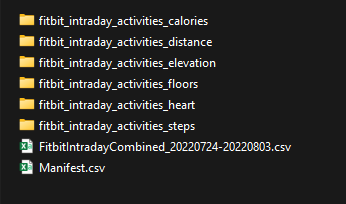
Each one of these folders contains a folder for each participant.
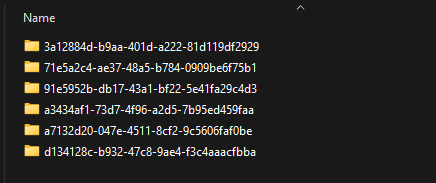
Each participant folder has a JSON file for each day.
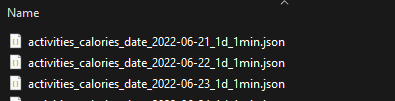
The files are named likeactivities__date_yyyy-mm-dd-1d_1min.json, where 1d means that it contains 1 day's worth of data and 1min means that the data is at a 1 minute resolution.
Sample JSON Export
Note that the example files below have been truncated for demonstration purposes. Real files will contain a sample for each period (1s, 1m) in a given day, even if the value for that sample is equal to 0.
{
  "activities-calories": [
      {
          "dateTime": "2022-06-21",
          "value": "1767"
      }
  ],
  "activities-calories-intraday": {
      "dataset": [
          {
              "level": 0,
              "mets": 10,
              "time": "00:00:00",
              "value": 0.7921000123023987
          },
          {
              "level": 0,
              "mets": 10,
              "time": "00:01:00",
              "value": 0.7921000123023987
          },
          {
              "level": 0,
              "mets": 10,
              "time": "00:02:00",
              "value": 0.7921000123023987
          }
      ],
      "datasetInterval": 1,
      "datasetType": "minute"
  }
}
{
  "activities-distance": [
      {
          "dateTime": "2022-06-21",
          "value": "6.333419999999999"
      }
  ],
  "activities-distance-intraday": {
      "dataset": [
          {
              "time": "01:41:00",
              "value": 0
          },
          {
              "time": "01:42:00",
              "value": 0
          },
          {
              "time": "01:43:00",
              "value": 0.0026000000070780516
          }
      ],
      "datasetInterval": 1,
      "datasetType": "minute"
  }
}